Subscriptions
The Subscriptions page lists every license you pay for, shows when each one renews or ends, and holds the controls to cancel it, turn its renewal back on and switch what pays for it. Lifetime licenses appear here too, with no renewal to manage.
Open Subscriptions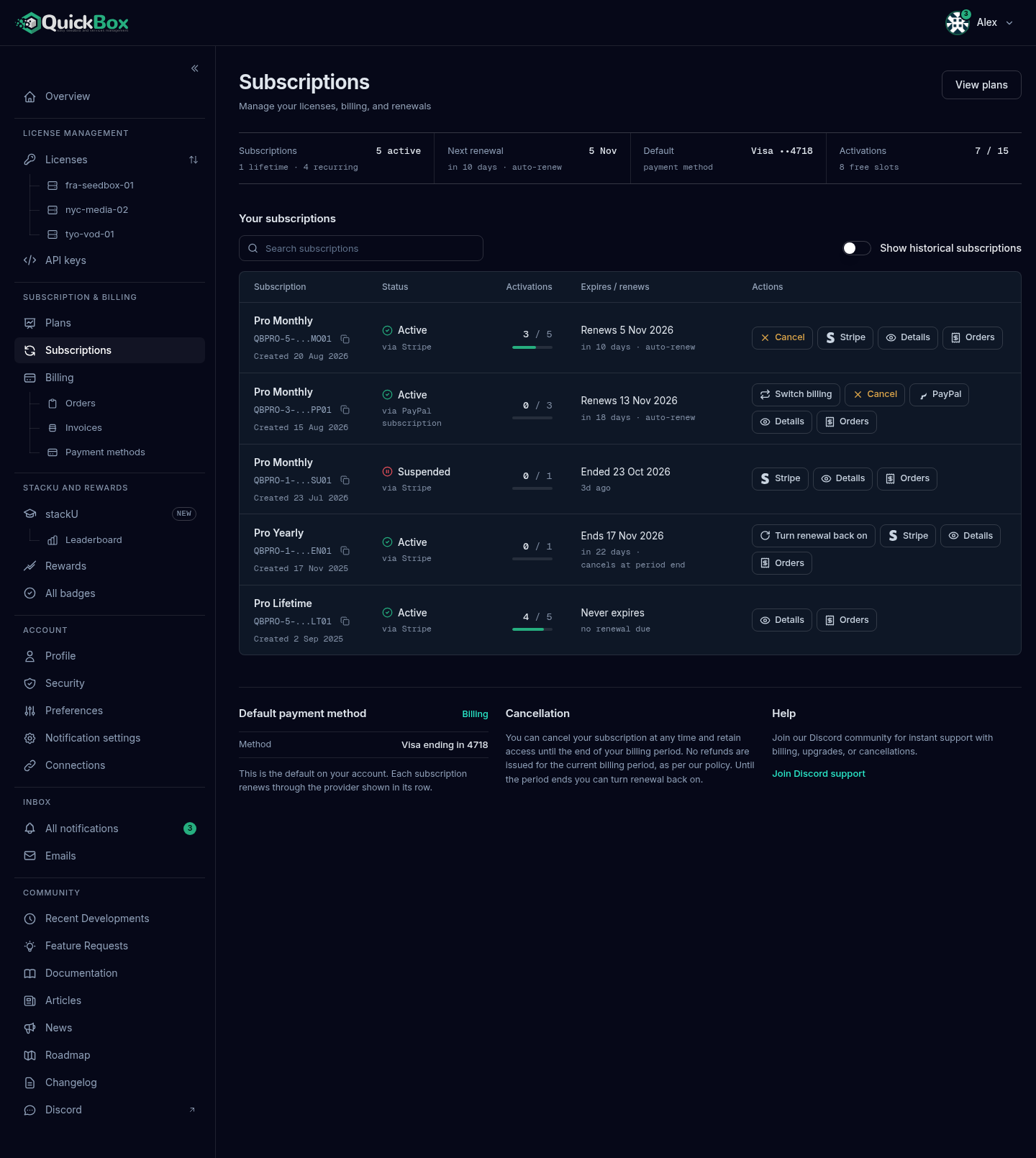
- Sidebar
- Subscriptions (under Subscription & Billing)
- Address
- /dashboard/
subscriptions - Who sees it
- Every signed-
in customer
What you will see
The header is Subscriptions with the line “Manage your licenses, billing, and renewals.” The View plans button opens the public pricing page. With no subscriptions yet, the page shows “No subscriptions yet” and a Browse subscription plans button.
The summary band
| Readout | What it shows |
|---|---|
| Subscriptions | How many are current, for example “2 active”, with “lifetime” and “recurring” counts beneath. |
| Next renewal | The date of the soonest renewal, with how many days away and whether it renews on its own. It is labelled Next end instead when that subscription is set to end or will not renew by itself. Reads “None due” when nothing is waiting. |
| Default | Your default payment method, such as a card brand and last four digits, or PayPal. Selecting it opens Billing. |
| Activations | Servers in use out of the servers your licenses allow, with the number of free slots. |
If a first payment failed, a notice under the band reads “A payment failed on one subscription. Access is suspended until it is resolved.” with a Review billing button.
The subscriptions table
Each row is one license.
| Column | What it shows |
|---|---|
| Subscription | The plan name and interval, the masked license key with a copy button, and a Migrated tag if the license came over from the earlier QuickBox platform. |
| Status | Active, Payment failed, Billing setup, Suspended, Expired or Cancelled. A failed payment also shows “Failed” with its date. |
| Billed via | What pays the renewal: Stripe, PayPal subscription, Saved PayPal account, or a note that credits paid the last one. On a narrower page this reads “via” under the status instead of being its own column. |
| Activations | Servers in use out of allowed, with a small meter. |
| Created | The date the license was created. On a narrower page it sits under the plan name. |
| Expires / renews | What happens at the end date. See the table below. |
| Actions | The buttons for that row. |
Below a laptop-sized window the table becomes a list of cards with the same details and buttons.
Use Search subscriptions to filter by key, plan, status, provider or created date. The Show historical subscriptions switch adds cancelled, expired and failed ones, and ones past their end date with no gateway. They are hidden until you turn it on, so a subscription whose first payment failed shows only after you do.

The Expires / renews column reads like this:
| Line | Second line | Meaning |
|---|---|---|
| Renews and a date | ”in N days · auto-renew” | It will be charged on its own on that date. |
| Ends and a date | ”in N days · cancels at period end” | You cancelled. Access continues until that date. |
| Ends and a date | ”in N days · manual renewal” | Nothing will charge it. It turns amber in the last 7 days. |
| Never expires | ”no renewal due” | A lifetime license. |
| Renewal due and a date | How long ago | The date has passed and the payment is still being retried. |
| Ends and a date | ”access suspended” or “payment needed” | Access is paused until the payment is made. |
| Ended and a date | How long ago, such as “3d ago” | The date has passed and access is not running. A subscription suspended after a failed payment reads this way. |
A suspended row gives no reason and no pay button: it shows only its provider button (Stripe or PayPal), Details and Orders. To pay, go to Invoices for a Stripe renewal and pay the Pending invoice, or follow the saved-PayPal steps in Failed Payments & Grace Period. Add a card on Payment methods if the card was the cause.
Under the table, three notes repeat the essentials. Default payment method shows the method on your account and says “Each subscription renews through the provider shown in its row.” Cancellation states that you keep access until the end of the billing period, that no refunds are issued, and that you can turn renewal back on until then. Help links to the Discord support community.
The row buttons
Which buttons you see follows how the license is billed. Lifetime rows show only Details and Orders.
| Button | Where it shows | What it does |
|---|---|---|
| Switch billing | A PayPal subscription that is active and not set to end, and eligible to switch | Moves its renewals to your saved PayPal account. See below. |
| Cancel | An active subscription that is not already set to end | Stops the next renewal. |
| Turn renewal back on | A subscription set to end at the period end | Reverses the cancellation. |
| Stripe | A subscription billed by Stripe | Opens Stripe’s page for your card and billing in a new tab. |
| PayPal | A subscription billed by a PayPal subscription | Opens PayPal’s automatic payments page in a new tab. |
| Details | Every row | Opens the license page. |
| Orders | Every row | Opens Order history filtered to that license. |
Cancel a subscription
- On Subscriptions, find the row and select Cancel.
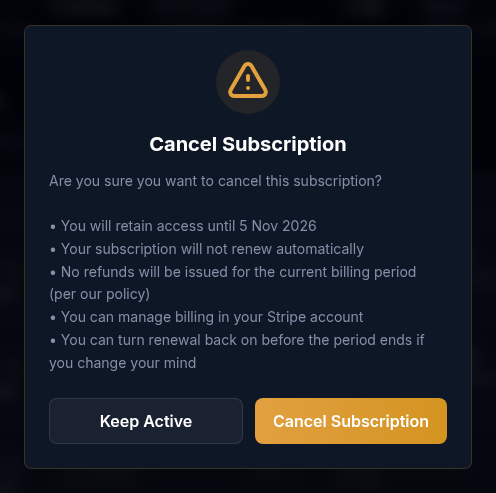
- Read the Cancel Subscription dialog. It confirms that you keep access until the end date, that your subscription will not renew automatically (or, for a saved PayPal account, that it will not be charged for a renewal), that no refunds are issued for the current period, and that you can turn renewal back on before the period ends.
- Select Cancel Subscription to confirm, or Keep Active to leave it as it is.
- The row now reads “Ends” with the date and “cancels at period end”. We email you a confirmation with the date and a link to your subscriptions page.
Cancelling does not remove access today, refund the period you paid for, delete your account or affect your other subscriptions. Each license is cancelled on its own.
Turn renewal back on before the period ends
If you cancelled and changed your mind, any subscription that still shows “cancels at period end” can have its renewal turned back on:
- On Subscriptions, find the row that reads “Ends” with the date and “cancels at period end”.
- Select Turn renewal back on.
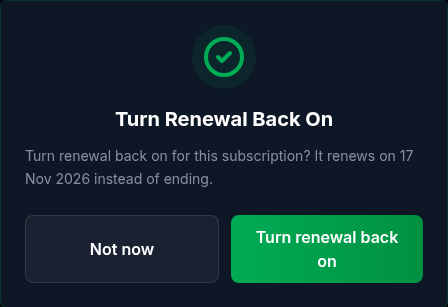
- In the dialog, read the date it will renew instead of ending, then select Turn renewal back on. Select Not now to leave it.
- The row goes back to “Renews” with the same date. No new charge is made and no new subscription is created.
After the paid period ends, the subscription is Cancelled or Expired and cannot be turned back on. You would then buy a new subscription on Plans or a lifetime license.
If you follow a link in an email to resume, you land on the Reactivate subscription page for that license. It shows the same subscription, and its Reactivate subscription button does the same thing as Turn renewal back on. If the subscription has already ended, the page says “Cannot reactivate” and offers View plans.
Switch an older PayPal subscription to your saved PayPal account
A PayPal subscription started the older way already renews on its own, but PayPal charges it a fixed amount, so site credits cannot come off its renewals. Switching changes what pays the renewal, so your credits can come off first.
- On Subscriptions, find the PayPal subscription and select Switch billing.
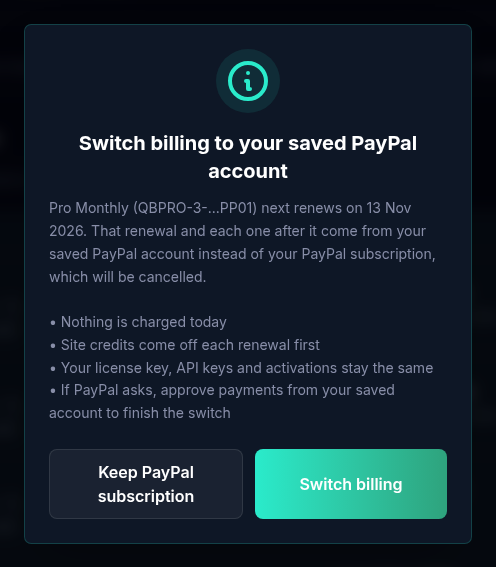
- The dialog Switch billing to your saved PayPal account names the license and its next renewal date. Read it:
- Nothing is charged today.
- That renewal and each one after it come from your saved PayPal account, with site credits taken off first.
- Your PayPal subscription is cancelled.
- Your license key, API keys and activations stay the same.
- Select Switch billing to confirm, or Keep PayPal subscription to leave it.
- If PayPal asks, approve payments from your saved account to finish. You come back to Subscriptions with “Billing switched. Your next renewal comes from your saved PayPal account, with site credits applied first.”
The row’s Billed via changes from “PayPal subscription” to “Saved PayPal account”. If you close PayPal without approving, nothing changes and your PayPal subscription keeps billing.
The Billing page also reminds you with a Switch link under Needs attention when a PayPal subscription can switch.
What happens at renewal
On the renewal date your site credits come off first, and only the remainder is charged.
- Stripe. The card on file is charged.
- PayPal subscription. PayPal charges its fixed amount from the funding source set inside your PayPal account.
- Saved PayPal account. The saved account is charged what is left after credits.
When your credits cover the whole renewal, it is settled with no charge. When the charge works, the end date moves forward one billing period and you get a receipt in Orders & Invoices.
If a charge fails, it is retried. For a renewal from your saved PayPal account you receive the payment-failed email and an in-app notice once, and it is retried daily. About an hour after the paid period ends without payment, access is suspended, the status reads Suspended, and the 72-hour grace period starts. See Failed Payments & Grace Period.
Credits on renewals
Credits come off every renewal first by default, from a card or a saved PayPal account. To keep them, turn off Auto-apply credits to renewals in Preferences. Coupons apply to the first payment at checkout, not to renewals. The Rewards guide covers points and credits.
Renewal emails
You receive a renewal reminder only in some cases. A yearly subscription that renews on its own gets one notice 7 days before. A monthly one gets none before the charge, and the receipt follows it. A subscription set to end gets one notice 3 days before access ends, with a link to resume. You can control these in Notification settings.
Moving between Stripe and PayPal
A subscription stays on the gateway it was bought with. To move, cancel it, let its paid period run out, then buy a new subscription with the other gateway. Checkout refuses a second subscription while one is still running, even one set to end, so the new purchase waits for the old period’s end and there can be a short gap in access. Ask in Discord if you want help timing the move.
Troubleshooting
Symptoms
- There is no Cancel button on my row
- My row has no Switch billing button
- A subscription I expected is missing from the list
- The row says "manual renewal" in amber
- The row shows Suspended
Resolution
- Cancel shows only on an active subscription that is not already set to end, and never on a lifetime license. A row that is suspended or has a failed payment is handled under Failed Payments instead.
- Switch billing shows only for a PayPal subscription that is active and not set to end. A subscription renewing from your saved PayPal account, or on Stripe, has nothing to switch.
- Cancelled, expired and failed ones are hidden by default. Turn on Show historical subscriptions.
- Nothing will charge that subscription, so it ends on the date shown. Buy a new plan on Plans before then.
- A renewal could not be collected. You have 72 hours to pay; follow Failed Payments & Grace Period.
Frequently asked
Do
- Cancel as soon as you decide not to renew; access continues through the paid period.
- Turn renewal back on before the period ends if you change your mind.
- Switch an older PayPal subscription to your saved PayPal account if you want credits to come off its renewals.
- Keep a payment method saved and current so renewals do not fail.
Don't
- Don't expect a refund for unused time after cancelling.
- Don't wait until after the period ends to change your mind; the subscription is then finished.
- Don't expect changing your default payment method to move a subscription to another gateway.
Related guides
Join the Community
Media server operators sharing configs, getting support, and shaping the future of QuickBox Pro.
- Dedicated Support
- Feature Previews
- Community Configs
- Active Discussions