Lifetime Licenses
A lifetime license is a one-time purchase that gives you access for the life of the product, with no renewal charges and no end date. This page explains how a lifetime license differs from a subscription, how to buy one, where it appears in your portal, and the narrow cases in which one can be ended.
Open Plans- Buy it
- Lifetime (under Subscription & Billing, then Plans)
- Button
- Get lifetime access
- Where it shows
- Licenses (and Subscriptions, as "Never expires")
Lifetime or subscription
| Lifetime license | Subscription | |
|---|---|---|
| Payment | One time, at purchase | Recurring on a billing cycle |
| End date | None | Active until cancelled or the grace period ends |
| Renewals | None | Automatic from your saved card or PayPal account, with site credits taken off first |
| Grace period | Does not apply | 72 hours after a failed renewal |
| Cancel button | None | On the Subscriptions page |
| Can be reversed | Only in the cases below | Cancellation can be undone until the paid period ends |
“Lifetime” means the life of the product, not the buyer’s own lifetime. As long as QuickBox Pro is developed and operated, your lifetime license stays active. There is no countdown, no automatic cancellation and no renewal step.
In practice:
- You can remove every payment method from your account and the license stays active.
- You can cancel your subscriptions, or let other parts of your account lapse, and the license is unaffected.
- You can move between your own servers within the number of servers the license allows. The license itself does not change.
Buy a lifetime license
- Open Plans from Subscription & Billing in the sidebar.
- In the Plan type switch, choose Lifetime. The switch only appears when both kinds are on sale; if only lifetime licenses are offered, the page shows “Lifetime licenses” as a label.
- Select the card for the number of servers you want. Lifetime cards show the one-time price and the price per server.
- Check Your selection, which reads “Billed once”, then select Get lifetime access.
- In Complete your purchase, add a coupon or credits if you have them, then choose Stripe or PayPal and pay.
When coupons and credits cover the whole price, the dialog shows Nothing to pay. Either payment row finishes the order without taking a payment, and the license is issued straight away.
After the payment confirms you land on Licenses, where the new license is ready to use.
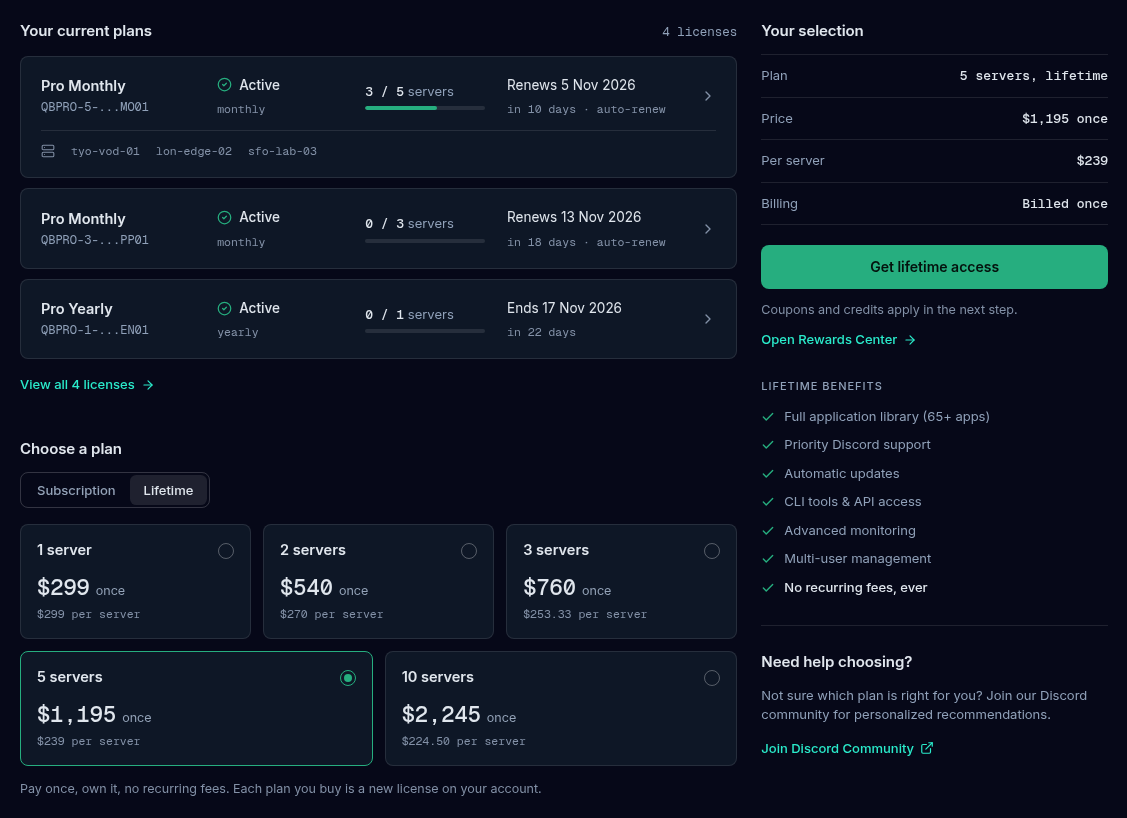
A lifetime purchase is not affected by the rule that blocks a second subscription, so you can buy one while a subscription is running.
Where it shows up
- Licenses. A lifetime license is listed with its servers and keys like any other.
- Subscriptions. The row’s Expires / renews column reads “Never expires” with “no renewal due”, and its only buttons are Details and Orders.
- Billing. If lifetime licenses are all you have, Next charge reads “None” with “lifetime, nothing due”.
- Orders and Invoices. The purchase appears once, as a Lifetime order, with a receipt in Orders & Invoices.

You can hold lifetime licenses and subscriptions on the same account at once. They do not replace each other, and each has its own servers and keys.
When a lifetime license can be ended
A lifetime license is not unconditional. There are three narrow cases.
- Fraud or a chargeback on the original purchase. If the payment that funded the license is reversed, the license ends with it.
- Any refund of the original purchase. QuickBox Pro has a strict no-refund policy, so this is rare. If any refund is issued on that purchase, partial or full, the license ends with it.
- A Terms of Service violation. If your account is suspended or ended under the Terms of Service, the license can be ended. The same standard applies to subscriptions.
Account inactivity, removing payment methods, lapsed subscriptions on the same account and not using the license do not affect it.
Frequently asked
Do
- Buy a lifetime license if you want a single payment and no recurring billing.
- Check the servers a license allows before you buy, and buy another license for more.
- Read the Terms of Service so you know what would put a license at risk.
Don't
- Don't expect a refund or proration on a lifetime license.
- Don't share a license beyond the servers it allows; that is a Terms violation.
- Don't file a chargeback over a billing question; ask in Discord first so the license is not lost.
Related guides
Join the Community
Media server operators sharing configs, getting support, and shaping the future of QuickBox Pro.
- Dedicated Support
- Feature Previews
- Community Configs
- Active Discussions